No ceiling on the front end
Anything you can build in React, you can ship. The theme stops being the thing that decides what is possible.
HEADLESS COMMERCE
Headless decouples the storefront from Shopify’s theme layer: Shopify keeps the catalog, cart, checkout and orders, and a front end you control renders everything a customer sees. It buys freedom and costs simplicity, so the first job is deciding whether you need it at all.
IN SHORT
Most conversations that begin with “we’re thinking about headless” are really about something else. The store is slow. The theme has been extended by four agencies and nobody wants to touch it. Marketing waits a week for a landing page. Those are real problems, and none of them requires replacing the rendering layer.
A speed program fixes the first, a theme rebuild fixes the second, and a section library fixes the third. Each costs a fraction of a rebuild, and each is reversible. Headless pays off when the front end is the constraint, and that is a narrower case than the marketing around it suggests.
Splitting the storefront from the commerce platform. Shopify keeps products, inventory, cart, checkout and orders; a separate application renders the pages and talks to Shopify through the Storefront API. The “head” that is removed is the theme layer: Liquid templates and the theme editor that comes with them.
| Stay on Liquid | Go headless | |
|---|---|---|
| Your storefront is slow | Almost always the answer. The cause is usually apps and images, and both survive a replatform | Only if the theme itself is unfixable, which is rare |
| You need a complex configurator | Workable up to a point, with a custom app doing the heavy lifting | Right call once the interface stops fitting inside a product page |
| One front end for web and native app | Not possible: Liquid renders web pages only | This is the strongest case for headless there is |
| Content comes from several systems | Possible with metafields, awkward beyond a certain volume | Right call: composing sources is what a headless front end is good at |
| Merchandisers publish their own pages | Theme editor does this for free | Costs you a CMS, a content model and a migration of everyone’s habits |
| You have no in-house front-end team | The safe choice: a theme can be handed to any Shopify developer | Risky. You now own a codebase, and the pool of people who know it is you |
A slow storefront, a design the theme cannot express, and a merchandising workflow nobody likes are three different problems with three different fixes. Only one of them is solved by going headless, and it is the rarest of the three.
Front-end engineering, a CMS, replacements for script-injected apps, and a team that can maintain a codebase after launch. The build is usually the smallest line on that list.
Hydrogen and Oxygen if there is no strong existing preference. The Storefront API directly if your team already runs a framework well, or the storefront is one surface inside a larger application.
Leaving Liquid means losing the theme editor. Editorial content moves to a headless CMS, products stay in Shopify, and the front end composes both. Deciding this late is the most common way these projects stall.
Filtering, pagination and search behave differently at ten thousand SKUs than at fifty. Load-test the queries during the build, because the Storefront API bills by query cost and throttles designs that ignore it.
Move the templates that justify the project first and leave the rest on Liquid until they earn the move. A partial headless site is a legitimate destination, not a failed migration.
Anything you can build in React, you can ship. The theme stops being the thing that decides what is possible.
Web, native app and in-store screens can share components and data instead of each getting its own build.
Editors publish in the CMS, merchandisers work in Shopify, and neither waits on a developer to ship a page.
That is the cost, stated plainly. It needs maintenance, dependency updates and people who understand it, indefinitely.
We have not yet taken a client fully headless, and we would rather say so than imply otherwise. What we have built is the hard part of these projects on Shopify itself: a bundle builder for Tayst that captures a multi-step configuration and pushes it into Recharge subscriptions, the Find Your Moon tool for Moonglow that renders a moon phase from a date and drives a personalized product, and a capacity engine for Eat Cake Today where vendor lead times decide which delivery slots a customer can pick at checkout.
Those are the interfaces people usually go headless to build. Knowing when they fit inside Shopify is why this page spends most of its length talking you out of the rebuild.
Clients from the roster whose work this page describes. Each links to what we built.
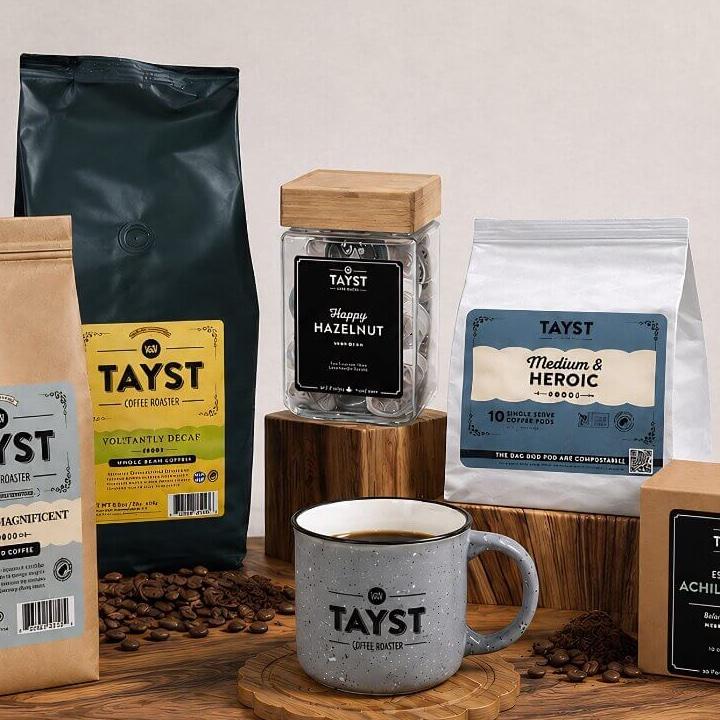
Tayst launched a new brand of compostable single-serve coffee pods. We built the Shopify store and a guided builder: shoppers say how they brew, how many drinkers there are, which roast they like and how many cups they need, get a recommended mix they can change, and the bundle becomes a Recharge subscription with a 15% discount. Tayst has grown about 20% month on month.
READ THE STORY →Moonglow sells jewelry set with the moon as it looked on a date that matters to you. Shoppers were stuck on how it works, so we built a moon-phase calculator that shows the real moon for any date, and a builder that turns that date, an engraving and a metal into a piece of jewelry. Sales are up more than 25%.
READ THE STORY →Eat Cake Today is a funded Malaysian startup that sells cakes from many local bakers and kitchens and delivers them the same day. We built the Shopify storefront and the back end behind it: each vendor's capacity and each cake's making time decide which dates and times a shopper is offered, and each order goes straight to the kitchen and a rider. The service now covers three to four cities.
READ THE STORY →An architecture where Shopify continues to run the catalog, cart, checkout and orders, but the storefront a customer sees is a separate application you build and host, reading data through the Storefront API instead of rendering Liquid templates.
Probably not. Headless earns its cost when the front end is the constraint: a configurator Liquid cannot express, one front end shared across web and native app, or content composed from several systems. If the complaint is page speed or an unwieldy theme, fixing those directly is faster, cheaper and reversible.
Not automatically, and plenty of headless builds are slower than the theme they replaced. A headless front end removes the theme and app scripts that usually cause the problem, but it replaces them with a JavaScript bundle that can be just as heavy if nobody sets a performance budget and holds to it.
The theme editor, most apps that work by injecting a script into your theme, and the ability to hire someone who already knows your stack. In exchange you get a front end with no ceiling. That trade is worth making far less often than it is made.
Yes, in every build we would recommend. Shopify Checkout carries the PCI scope, handles local payment methods, and converts better than a custom equivalent. Rebuilding it is possible on Plus and is almost never a good idea.
Yes, and it is usually the better plan. Serving product pages from a headless front end while collections and content stay on Liquid limits both cost and risk, provided the two halves are treated as one site for URLs, analytics and internal linking.
Shopify’s own React framework and hosting, the shortest path to headless that keeps you inside supported territory.
A custom front end on Next.js or your existing stack, reading catalog and cart from the Storefront API.
Editorial content in Sanity or Contentful, product data in Shopify, composed into one front end without either team blocking the other.
Moving an existing theme to a headless front end without losing URLs, SEO or the merchandising your team relies on.
NEXT STEP
Most stores that ask about headless have a theme or app problem instead. A senior engineer will tell you which one you have, at no cost.