NURSERY AND PLANTS · US · RAINTREENURSERY.COM
Raintree Nursery: Batch shipping app
Raintree Nursery takes pre-orders now and ships plants when the season comes. ShipStation could not group orders by the dispatch date in their tags, so we built a small shipping app: orders sync in as batches by dispatch date, labels print for a whole batch at once, USPS and UPS connect directly, and orders to the same address ship together.
IN SHORT
- Raintree Nursery sells most plants as pre-orders and ships them when the season comes, so orders have to be sent in groups by dispatch date.
- ShipStation could not group orders by a date in an order tag, so we built a small shipping app that does.
- Orders sync into batches by dispatch date, and the team prints labels for a whole batch at once through a direct USPS and UPS connection.
- Several orders to the same address are grouped into one shipment, so the customer is not charged for separate deliveries.
The challenge
Raintree Nursery's main business is pre-orders. A customer orders months ahead, and the plants are dispatched when the season arrives, so an order is not shipped on the day it is placed. What matters is the dispatch date, and all the orders for one date need to be picked, packed and labeled together.
The nursery was using ShipStation, which could not work with tags, the one place the team could record a dispatch date. So staff put the date in each order's tag and made batches by hand. That is slow with hundreds of orders for a single date, and it left no way to see which orders belonged together. The plants add a second wrinkle: they ship in boxes of different sizes because they come in different heights, and a customer who orders twice may have two orders for one address.
- Client
- Raintree Nursery (raintreenursery.com)
- Industry
- Nursery and plants
- Market
- US
- Platform
- Shopify, with a custom app
- Carriers
- USPS and UPS
- Result
- About 50% fewer hours on batching and labels
How we approached it
- 01
Start from how the team already worked
We took the nursery's own method, a dispatch date in the order tag, and made it the app's organizing idea instead of replacing it.
- 02
Sync orders into batches by date
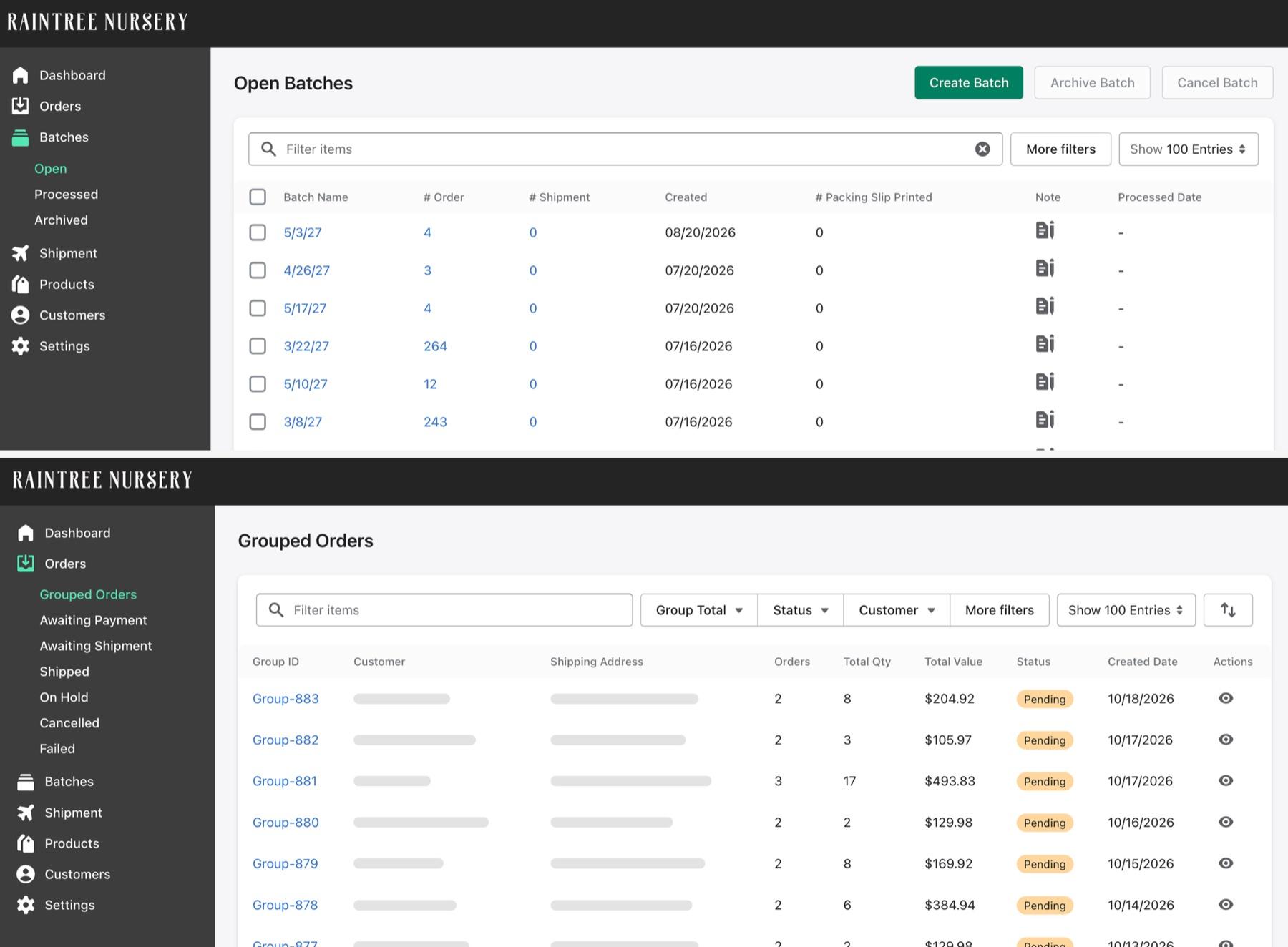
When an order in Shopify carries a dispatch date in its tag, it syncs into the app and lands in the batch for that date. A batch shows its order count, its shipments and how many packing slips have been printed.
- 03
Print everything for a batch at once
From a batch the team creates the shipping labels and packing slips for every order in it in one step, so everything going out on a given day is handled together.
- 04
Connect the carriers directly
We connected the app straight to USPS and UPS, so labels are created in the app and ShipStation is no longer in the chain. It is a small version of ShipStation that does the one thing the nursery needed.
- 05
Choose the package per shipment
When a label is created the team picks the carrier and the box, because plants of different heights need different box sizes, and the ship-from location is set in the app.
- 06
Group orders to the same address
Orders for the same address are gathered under one group, with a group total of orders, quantity and value, so they ship in one box or shipment and the customer is not charged for separate deliveries.
- 07
Write tracking back to Shopify
Shipping details go back to Shopify, so tracking updates at order level and the shipment history sits on the order.
Batches by dispatch date, and orders grouped by address
The Open Batches screen is a list of dispatch dates. Each batch is named for its date, such as the batch of 3/29/27, and shows how many orders it holds, how many have shipped, when it was created and how many packing slips are printed. The side menu keeps batches in Open, Processed and Archived, so a finished batch leaves the working list.
The Grouped Orders screen handles the second requirement. Each group is a customer's orders to one address: a group of two orders with eight plants in total, for example, is filled and shipped together. The sidebar also sorts orders into Awaiting Payment, Awaiting Shipment, Shipped, On Hold, Cancelled and Failed, so nothing is lost between placing an order and delivering it.
The team does the work in one place, and Shopify stays the record: orders come from it, and tracking and shipment history go back to it.
The result
The nursery no longer builds batches by hand or depends on ShipStation. Orders arrive grouped by dispatch date, labels print for a whole batch, and orders to the same address go out together. The team spends about half the hours it used to on grouping and batch creation, on Lucent's account.
The app is deliberately small. It does the grouping the nursery needed, and leaves the rest to Shopify and the carriers.
- Fewer hours on batch creation and grouping, as Lucent reports it
- 50%
- Carriers connected directly: USPS and UPS
- 2
Questions about the Raintree Nursery migration
What did Lucent Commerce build for Raintree Nursery's shipping?
A small shipping app that groups orders into batches by dispatch date, prints labels for a batch together, connects to USPS and UPS, and groups orders to the same address.
Why not keep using ShipStation?
ShipStation could not group orders by a dispatch date held in an order tag, which is how the nursery works, so the team had been making batches by hand.
How are orders put into a batch?
An order whose tag carries a dispatch date syncs into the app and joins the batch for that date.
Which carriers are connected?
USPS and UPS, directly.
How are different box sizes handled?
When a label is created, the team picks the carrier and the box, since plants come in different heights.
Why group orders to the same address?
So they ship together and the customer is not charged for separate deliveries.
What results did the nursery see?
About half the hours on grouping and batch creation are saved. The nursery no longer builds shipping batches by hand or depends on ShipStation. Orders arrive grouped by dispatch date, labels print for a whole batch, and orders to the same address go out as one shipment, with USPS and UPS connected directly.